TL;DR
As customer-facing integrations scale, API consumption grows with the number of connected customers and the activity within each tenant. AI agents add bursts of reads and writes alongside scheduled syncs, increasing pressure on API quotas shared with customers’ internal tools and other vendors. Managing performance and cost requires four engineering decisions:
Event subscriptions: Replace unnecessary polling with change events where supported.
Source filtering: Reduce event delivery, data processing, and downstream costs by filtering irrelevant changes.
Per-tenant quota budgets: Control API consumption and concurrency independently for each customer.
Read-mode selection: Use bulk APIs for historical backfills and event streams or incremental reads for ongoing synchronization.
Ampersand helps teams control API consumption and data volume through Subscribe Actions, field-level event filtering, configurable Read Actions, and scoped backfills as their customer base grows.
Why API Quota Management Breaks as Customer Count and Event Volume Grow
Customer growth multiplies API consumption
Integration load depends on the number of connected customers and the API calls and events each customer generates. Adding tenants increases active connections, and greater product adoption increases activity within each tenant. A sync design that consumes relatively few API calls across 20 customers can exhaust quotas and budgets as the customer base reaches 500.
Consider a polling integration with the following configuration:
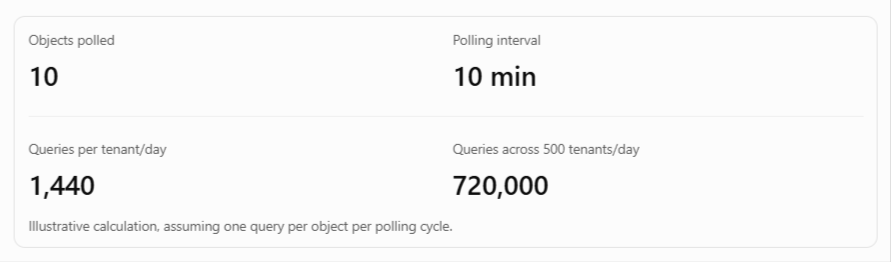
The integration generates 720,000 daily queries before accounting for actual record changes, agent activity, or other API operations.
AI agents introduce unpredictable API demand
AI agents expose the limits of traditional integration patterns by gathering context, retrieving related records, writing results, and verifying updates. These requests arrive as users initiate tasks and compete with scheduled syncs for the same customer API allocations.
Platform vendors are also accounting for agent traffic:
-
NetSuite: Oracle documents that its AI Connector Service shares account concurrency with other integrations unless an administrator assigns a dedicated allocation. MCP tool calls can also generate additional protocol requests that consume concurrency capacity.
-
Gmail: Google updated its API quotas on May 1, 2026, under its standardized model for agent tools and APIs. Projects created from that date are subject to the new quotas, while projects that used the Gmail API between November 2025 and April 2026 retain their earlier quotas.
API exhaustion affects customer operations
Your integration shares a customer’s API allocation with internal tools, warehouse extracts, and other vendors. Exhausting the shared quota can disrupt reports, delay automations, and generate support tickets for your product.
Managing API consumption per tenant preserves quota capacity for other applications and keeps integration performance stable as customer activity grows.
API Rate Limit Models Across CRM, ERP, and Email Platforms
Salesforce, HubSpot, NetSuite, and Gmail meter API consumption differently. Each platform’s limits determine how integrations must manage request frequency, concurrency, and quota consumption.
| Platform | API limits | Engineering response |
|---|---|---|
| Salesforce | Enterprise Edition starts at 100,000 requests per rolling 24 hours, scaled by license count. A separate limit applies to concurrent long-running requests. | Monitor remaining quota, optimize Salesforce API usage through request pacing, and use Bulk APIs for large reads. |
| HubSpot | Marketplace OAuth apps receive 110 requests per 10 seconds per installed account. Private apps have separate burst limits and shared daily allocations. | Use rate-limit headers to control request frequency, handle HubSpot 429 errors according to the exceeded limit, and budget CRM Search separately. |
| NetSuite | Concurrent requests are limited by service tier, with additional capacity available through SuiteCloud Plus licenses. | Cap parallel requests per tenant and coordinate dedicated allocations with customer administrators. |
| Gmail | Under the May 2026 quota model, eligible projects receive 1.2 million units per minute per project and 6,000 per user, weighted by API method. | Track quota consumption by method and favor lower-cost incremental reads where appropriate. |
The critical distinction is how each limit recovers. Burst limits require waiting for the request window to reset, daily allocations require sustained pacing, and concurrency limits require reducing simultaneous requests. Retrying without accounting for the exceeded limit can increase API pressure without restoring throughput.
Lever 1: Replace Polling with Event-Driven Integration
Polling generates API requests at fixed intervals, even when records remain unchanged. Increasing polling frequency improves data freshness but also raises API consumption across every connected tenant. At scale, frequent polling can also create synchronization delays as large customer workloads compete for shared processing capacity.
Event-driven integrations reduce unnecessary reads by delivering notifications when supported records are created, updated, or deleted.
Choose the right event mechanism
Event subscriptions vary by provider, with different setup requirements, supported objects, and delivery limits.
| Platform | Event mechanism | Key consideration |
|---|---|---|
| Salesforce | Change Data Capture (CDC) | Publishes record changes through event channels, subject to object support and event delivery allocations. |
| HubSpot | Webhook subscriptions | Supports subscriptions to CRM object changes, with a limit of 1,000 subscriptions per app. |
| Gmail | Push notifications | Uses watch to receive mailbox change notifications and history.list to retrieve the corresponding changes. |
Event subscriptions still require reconciliation. Notifications can be delayed or lost during outages, expired subscriptions, or delivery failures. Periodic incremental reads using the last successful checkpoint help recover missing changes without repeatedly fetching the entire dataset.
Implement event-driven sync with Ampersand
Ampersand’s Subscribe Actions deliver near-instant webhooks for supported create, update, and delete events. Each subscription requires a corresponding Read Action to supply field definitions and mappings, with an optional backfill to retrieve historical records during installation.
For HubSpot, Subscribe Actions also support associationChangeEvent to capture changes in record associations. The first events typically arrive within one to two minutes of installation. The Subscribe Actions documentation provides the configuration requirements, supported events, and backfill options.
Lever 2: Filter Events at the Source to Cut Delivered Volume
A record update can trigger an event even when the change isn’t relevant to your product. For example, a CRM automation might update a timestamp, recalculate a field, or modify a property your application never reads. Delivering every update increases event volume, queue writes, worker invocations, and storage costs.
Filtering irrelevant changes before delivery reduces the volume of data entering your integration. Where supported, source-side filtering can also reduce consumption of the provider’s event allocation.
Field-Level and Object-Level Event Filtering
Apply filtering at three levels to control the data your integration receives.
-
Object-level filtering: Subscribe only to objects your product needs, such as contacts and opportunities, to eliminate events from unrelated objects.
-
Field-level filtering: Monitor fields that drive product behavior, such as an opportunity stage or account owner, and exclude updates affecting only unrelated fields.
-
Record-level filtering: Restrict reads to records matching specific criteria, such as active accounts, to reduce data retrieved during synchronization and backfills.
Ampersand’s Subscribe Actions use requiredWatchFields to specify which field changes trigger update events. Setting watchFieldsAuto: all subscribes to every field change, and the two options are mutually exclusive.
For Salesforce, Ampersand also offers an opt-in quota optimization setting that filters irrelevant CDC events at the source to reduce event delivery volume and API quota consumption. Ampersand’s guide to reducing Salesforce CDC event volume covers additional filtering strategies for high-volume customer organizations.
For record-level filtering, Ampersand’s Read Actions support field-value filters for Salesforce and HubSpot. Filters can apply to both incremental reads and backfills, with separate criteria available for historical data.
The cost of an unnecessary event extends past delivery to processing, queue, and storage charges, and on usage-priced integration platforms, every delivered byte is billable. Filtering at the source removes that downstream work along with the event itself.
Cost Optimizations for Webhook Bursts
Webhook traffic can spike when a customer imports thousands of records, performs a mass update, or installs an integration that triggers a historical backfill. Automation loops can further amplify event volume, potentially overwhelming webhook endpoints and delaying processing.
Five controls keep a burst from reaching your workers unfiltered:
-
Filter before delivery: Limit watched fields and apply supported record filters to reduce unnecessary data volume.
-
Queue incoming events: Buffer deliveries and process them at a controlled rate to protect downstream workers.
-
Coalesce updates: Combine multiple pending updates for the same record into a single processing job when intermediate states are unnecessary.
-
Make consumers idempotent: Handle redelivered events safely to prevent duplicate writes during retries.
-
Bound historical backfills: Limit initial data retrieval to the period required by your product.
Ampersand delivers integration data to webhook endpoints or Amazon Kinesis streams for downstream processing. For large customer instances, those endpoints must be prepared to handle high message volumes during full-history backfills.
Lever 3: Budget API Quotas per Tenant
A customer-facing integration must control API usage independently for every connected tenant. A single customer with high activity or a large historical sync should never consume the processing capacity needed to serve other customers.
Treat Each Customer’s API Quota as a Shared Budget
API allocations may be shared with a customer’s internal applications and other vendors. Set a consumption ceiling for each tenant during onboarding, leaving enough capacity for the customer’s existing operations.
Use provider-reported usage to establish and monitor each budget:
| Platform | How to monitor quota consumption |
|---|---|
| Salesforce | Use the Sforce-Limit-Info response header to track daily API usage or the REST /limits resource to retrieve maximum and remaining allocations. |
| HubSpot | Read rate-limit response headers to monitor available requests within each interval. Daily quota headers apply to privately distributed apps, and CRM Search responses omit the standard rate-limit headers. |
| NetSuite | Check integration concurrency through getIntegrationGovernanceInfo for SOAP or governanceLimits for REST. The SOAP operation requires administrator access. |
Configure alerts before a tenant approaches its agreed ceiling. The integration should reduce background activity as available capacity decreases, preserving enough quota for higher-priority operations.
Per-Tenant Rate Limiting and Workload Isolation
A noisy tenant can overwhelm shared workers, delay other customers’ syncs, and trigger repeated rate-limit errors. Isolate workloads using four controls:
Per-tenant queues: Assign separate queues and worker concurrency limits so throttling one tenant does not delay others.
Platform-aware backoff: Honor provider retry signals and pause requests only for the affected tenant. HubSpot requires Marketplace-listed apps to maintain an API success rate of at least 95% for certification, so repeated rate-limit errors from one tenant can put the app’s certification at risk.
Priority tiers: Process user-initiated writes first, agent reads second, and background sync last. Slow lower-priority work when quota capacity becomes limited.
Per-tenant circuit breakers: Temporarily stop requests after repeated rate-limit failures and resume according to the provider’s recovery conditions.
For direct provider API calls, Ampersand’s Proxy Actions offer an optional throttle mode, set through the X-Amp-Rate-Limiter-Mode header. When the provider returns a 429, Ampersand supplies a recommended retry time and prevents subsequent requests from reaching the provider until then.
How to Handle Massive Concurrent Syncs Without Crushing Latency
When hundreds of tenants synchronize simultaneously, backfills and scheduled jobs can saturate worker capacity and delay time-sensitive updates.
Four scheduling decisions keep simultaneous syncs from starving time-sensitive updates:
-
Stagger schedules: Offset synchronization start times to distribute requests throughout the available window.
-
Cap concurrent backfills: Limit simultaneous historical loads and queue additional jobs until capacity becomes available.
-
Separate processing lanes: Use separate worker pools for onboarding backfills and ongoing synchronization.
-
Respect provider concurrency: For NetSuite, size parallel requests according to the allocation assigned to the integration.
Through Ampersand’s API, engineers can pause scheduled reads for an individual installation or selected objects, or trigger an on-demand read for a specific customer with optional timestamps to control the requested data range.
For Salesforce, Ampersand also supports per-customer sync mode selection to manage API consumption according to each installation’s requirements.
Lever 4: Batch vs Streaming Reads for Backfills and Incremental Sync
Historical backfills and ongoing synchronization have different performance requirements. Backfills retrieve large datasets, while steady-state sync processes changes as they occur. Your chosen read mode determines API consumption, processing latency, and data delivery costs.
Decision Rule: Bulk APIs for Backfills, Event Streams for Incremental Sync
| Workload | Recommended read mode | Reason |
|---|---|---|
| First installation or historical load | Bulk or asynchronous export APIs | Retrieve large record sets through fewer API operations. |
| Steady-state changes | Event subscriptions | Process supported record changes as they occur. |
| Objects without event support | Scheduled incremental reads | Retrieve records modified since the last checkpoint. |
| Recovery after an outage or subscription gap | Timestamp-bounded reads | Retrieve changes from the affected period without a full reload. |
Using an unsuitable read mode can create performance problems. Paginated REST requests for large historical loads may consume substantial API quota, while processing an entire backfill through an event pipeline can overwhelm queues and workers. Running bulk jobs repeatedly for small incremental updates can also introduce unnecessary processing overhead and delay data freshness.
Salesforce alone offers three routes to the same data. Its REST API, Bulk API 2.0, and CDC each fit different data volumes and synchronization requirements, and Bulk API 2.0 has separate limits for query and ingest operations, so engineers must account for the limits relevant to their chosen workload.
How to Scale Customer-Facing Connectors to Billions of Records
Large integrations must control payload size before data enters the processing pipeline. Assuming an average record size of 2 to 4 KB, one billion records would produce approximately 2 to 4 TB of data for downstream queues, workers, and storage systems to handle.
Five settings shrink a large-scale read before it reaches the pipeline:
-
Field selection: Retrieve only the fields required by your product to reduce payload size.
-
Backfill windows: Start with the last 30 or 90 days and extend historical coverage for customers who need it.
-
Backfill-specific filters: Apply narrower record criteria to historical loads without restricting subsequent incremental reads.
-
Resumable cursors: Checkpoint completed pages so failed jobs can resume without fetching previously processed records.
-
Progress tracking: Expose records processed and estimated totals so engineering and customer success teams can monitor onboarding.
Ampersand’s Read Actions support full-history and time-bounded backfills, including configurable periods such as 30 or 90 days. Engineers can also apply separate field-value filters to historical reads, limiting the records retrieved during initial synchronization.
For monitoring, Ampersand’s backfill progress API reports the number of records processed against an estimated total, where available. A triggered read also accepts sinceTimestamp to retrieve changes for an individual customer from a specified point, supporting recovery without reloading the entire dataset.
Measuring Integration Cost per Customer
Aggregate integration costs can hide substantial differences in resource consumption between customers. A tenant processing millions of records may account for a disproportionate share of API usage, data delivery, and infrastructure spending. When engineering teams track each customer’s consumption separately, they can identify expensive workloads and forecast costs.
Per-Tenant Metrics: API Calls, Events Delivered, and Data Volume
Start by attaching a tenant identifier to every API request, delivered event, and data payload when you record the activity. Tagging at write time lets you attribute consumption accurately and investigate unexpected spikes without combing through aggregate logs.
Track three core metrics for each customer:
| Metric | What to measure | What it reveals |
|---|---|---|
| API calls | Provider requests by object and operation, including retries. | Workloads consuming the customer’s API allocation. |
| Events delivered | Individual subscription events received by the destination, grouped by tenant and object. | Event traffic and downstream processing demand. |
| Data volume | Bytes delivered per tenant, including historical backfills. | Workloads contributing to data delivery and infrastructure costs. |
Monitor remaining API quota alongside these metrics to identify customers approaching their allocations. To evaluate filtering effectiveness, use provider-side event metrics where available, since destination logs cannot account for events excluded before delivery. Comparing total integration costs with each customer’s contract value also helps engineering and finance teams assess customer-level profitability.
Measuring usage with Ampersand
Ampersand’s dashboard covers monitoring and troubleshooting for customer integrations, and webhook payloads include groupRef and installationId for attributing delivered data to individual customers. Engineers can use these identifiers to aggregate event counts and payload sizes by tenant, accounting for both inline webhook results and records delivered through download URLs.
For centralized monitoring, Ampersand offers Google Cloud Logging integration and support for other logging providers through its Accelerate plan. Use destination measurements to estimate customer-level consumption and reconcile the results with Ampersand’s reported billable usage.
How Usage-Based Integration Pricing Turns the Four Levers into Cost Savings
Ampersand’s pricing is based on the volume of data processed and delivered, measured in gigabytes. Read and Subscribe Actions count data sent to destinations, Write Actions count data sent to providers, and Proxy Actions count the response body for GET requests or the request body for other methods. There are no separate per-connection or per-integration charges.
Ampersand’s Catalyst plan starts at $999 per month and includes 2 GB of monthly data delivery for up to 25 production customers. The published usage estimates provide a starting point for forecasting consumption across different customer workloads.
| Customer workload | Estimated data volume |
|---|---|
| Early-stage tenant with 8,000–10,000 CRM records and light daily updates | 0.10 GB/month |
| Mid-market tenant with approximately 80,000 records and more active traffic | 0.30 GB/month |
| Historical backfill of approximately 150,000 records | 1.0 GB per backfill |
Actual consumption depends on record size, selected fields, update frequency, and historical data requirements.
Event subscriptions reduce unnecessary polling, and per-tenant budgets control API consumption and retry overhead. Source filtering and scoped backfills reduce the volume of data delivered through Ampersand, lowering usage-based charges when they eliminate billable data.
Setting appropriate historical windows, monitoring delivered volume, and scheduling large backfills deliberately can help teams anticipate onboarding-related cost increases before they appear on an invoice.
Scale customer-facing integrations with Ampersand →
FAQs: The Performance and API-Cost Engineering Guide (2026)
What are the best practices to handle rate limits at scale?
Start by identifying which provider limit was exceeded and whether the failure affects a single customer or multiple tenants. Use response headers and error codes to determine the appropriate recovery time, then monitor repeated failures to identify workloads that need adjustment. For direct API calls, Ampersand’s Proxy Actions offer a throttling mode that provides recommended retry times after provider 429 responses.
How do AI agents change integration load?
AI agents introduce unpredictable traffic because a single task may involve several dependent API requests. Concurrent agent sessions can multiply demand within one customer account, making average daily usage a poor indicator of peak load. Track agent requests separately to understand their effect on available capacity and establish appropriate execution limits.
How do you keep embedded iPaaS costs predictable when data volumes vary month to month?
Build usage forecasts from customer record counts, average payload size, update frequency, and expected onboarding activity. Compare projected consumption with actual data delivery throughout the billing period and investigate unusual increases early. Ampersand measures usage by data volume, so teams can estimate costs based on how much information their integrations process and deliver.
When is polling still an acceptable integration pattern?
Polling is appropriate when a provider lacks event support, the application tolerates delayed updates, or data changes infrequently. For example, a nightly reporting integration may have little reason to request changes every few minutes. Choose an interval based on the product’s freshness requirements and use incremental queries where the provider supports them.
How can teams forecast costs for large data syncs?
Use a representative sample to estimate the average record size, then calculate the expected data volume for historical backfills and ongoing updates. Compare the total against Ampersand’s data allowances and usage rates to estimate costs before starting the sync.
What is the difference between API quota management and API rate limiting?
API rate limiting refers to restrictions enforced by a provider, such as requests per second, daily allocations, or concurrent request limits. API quota management covers how an integration tracks and allocates its available capacity across customers and workloads. Rate limiting determines when to restrict requests, while quota management helps prevent applications from exhausting their allocations.